Fleshing out Animations
Updated: Apr 17, 2024
Added abstraction to 3 hit combo animation logic in the Player Character's base class. The previous version played the animation from the TPC, which is bad, because animations are skeleton-specific, and each player character has a different skeleton. The new version calls a function that, in the base TPC class does nothing, however in the Child classes, such as the Hero, it will be overridden to play the individual animations based on the animation number used for the attack combo logic. This allows each playable character to have different basic attack animations set to their personal skeleton, whilst using the same logic.


Also fleshed out Hero AnimBP a bit to replace all the animations, and add flying to the state machine, utilising the IsFlying bool variable from the character movement component to base the flying state from. The animation has been added, but at the moment the hero remains flying flat whilst flying. Will look to implement control of the up/down rotation of the Hero based on the camera soon.


I then found & downloaded animation assets for the Villain from Mixamo. I want the Villain to feel like a bulkier fighter than the Hero. For this I picked some orc & dwarf walking/standing animations, for the gruffier gait.
For the Villain's flight animation however, I found a problem. My vision for the villain was that they would hover upright using their battle suit, iron-man style, however there were no animations like that on Mixamo.
To resolve this, I took the horizontal flying animation that I used for the Hero, and applied it to the Villain. I then created a copy of the animation, and edited it so that he stands upright and faces forward. I also tweaked the limbs, so it looks like he's balancing his weight with a propulsion system.


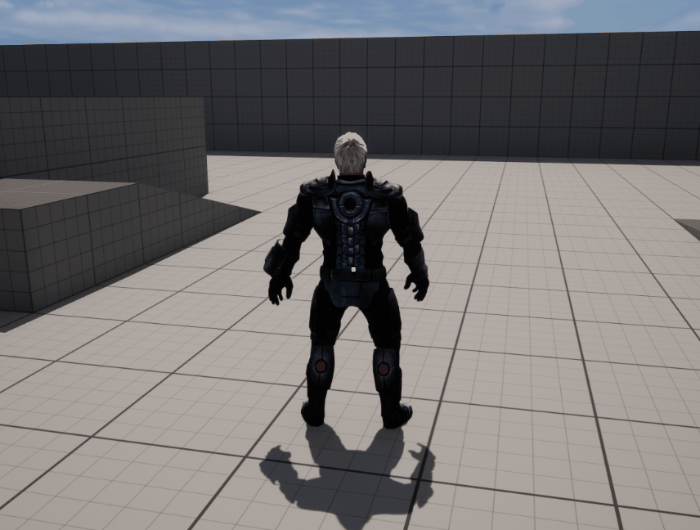
After importing and applying the Villain's animations, I came across a familiar issue that I found with the Hero's mesh, that apparently occurs often when using Mixamo content, which is that the mesh and animations can often float a little off the floor.
I tried a number of different ways to resolve this. One solution I found was to simply lower the mesh's Z value in the Blueprints's Viewport. This fixed the view of the mesh, however, as the Hero/Villain hitbox capsule was the root of the Blueprints, lowering the mesh makes the feet extend below the capsule, with the character's head a ways below the top of it. This gap could create weird interaction in future, with abilities hitting or missing when they should make contact. I could increase the size of the mesh, so that whilst the feet still extend below the capsule, the head meets the top of it. But this isn't a perfect solution.
I then attempted to fix it by adjusting the root of the skeleton & mesh, thinking that would fix the problem on all the animations, but they didn't adjust, floating when any animation was played, so the solution I went with was to reimport the mesh & each of the animations with a lower Z value, until the feet are flush with the floor. This fixed the problem, although it's still not exactly perfect.
Implemented animations for villain. Came across the familiar Floating issue. so adjusted each animation by reimporting with a -27 Z translation. This seems to have solved the issue.
To complete this section of animations, I will look to download and reimport the first jab of the hero's basic attack combo, as the current one lunges her forward. I initially used that animation, as I thought the lunging forward would help cover distance when attacking NPC minions with melee attacks. However it looks awkward and the travel time slows down the speed of the attack, so my solution is to use a Jab animation that is closer to her origin, then increase the hit range of the attack in future, either with just hit boxes, or by adding a VFX effect with a hitbox to visibly show the increased range.


Comments